International Women’s Day 2026


We’ve been updating the way booking extras are created and stored to make way for some exciting upgrades. From Monday 9th of February, part one of the changes will be ready and although you don’t need to do anything, here’s what you need to know…
When a guest makes their reservation on your direct booking pages, they’ll add any selected extras to the unit they want the extra for – ideal if they’re booking more than one unit. For you, this means no more guessing or having to check with the guest which unit was to get the extra.
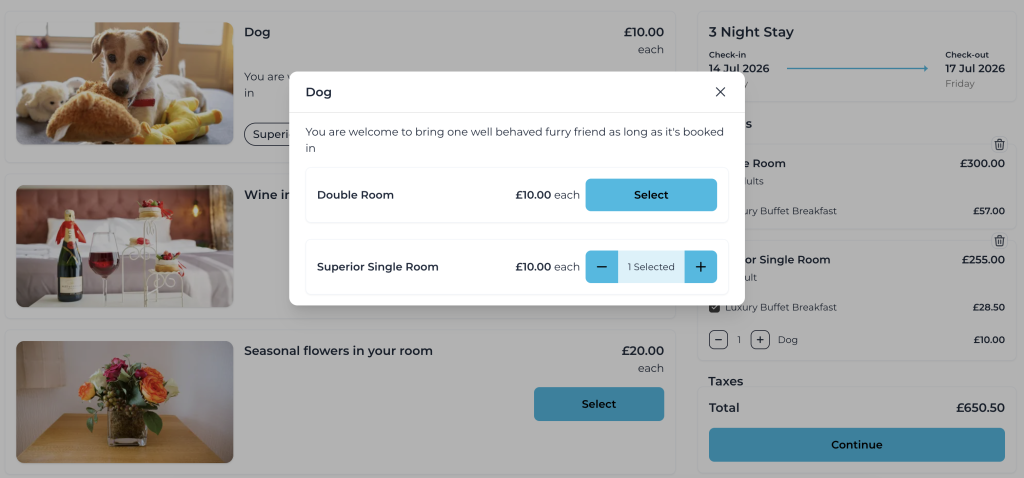
When you look at the booking in freetobook you’ll see the extras are stored at the ‘unit level’ and you can add or edit them there. Or you can still add at ‘booking level’ if you wish. When you’re checking a booking for extras, remember that during this transition phase you might see them in either of the two places.
To add or edit any extras at unit level just look for the Extras logo on the booking panel.
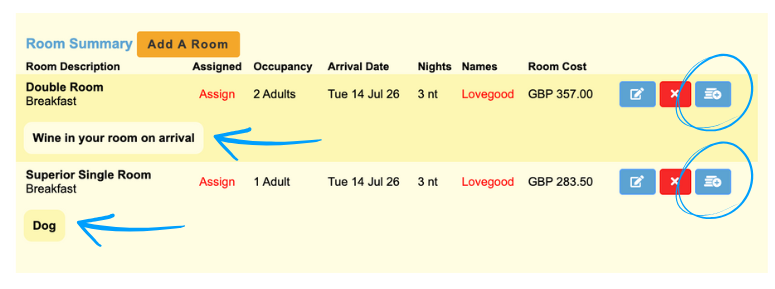
Allowing you or the guest to match units with extras means that you’ll always know which units need which extras – you’ll be adding the bottle of wine or the bunch of flowers to the right unit first time! The tooltip hover-over in the diary will show you the correct extras for that portion of the booking. This makes a booking with more than one unit booked much easier to manage.
The change to create specific Security Deposits and Cleaning Fees means these fees are highlighted on the first page of the booking process and are more transparent to the guest.
The change lays the foundation for more improvements to the overall freetobook system. As part of the soon-to-be-launched BloomPro feature we’ll be introducing other new functions to the booking extras. You’ll be able to:
Scan the QR code to download the app