International Women’s Day 2026

As busy independent hoteliers, your time is valuable. Don’t waste it on repetitive tasks like assigning your bookings to rooms.
That’s why we’ve introduced Auto-Assign.
As the name implies, Auto-Assign automatically allocates your existing and new bookings to specific room numbers – saving you time and hassle every day. Gone is the chore of manually clicking through each booking and deciding where to put your guests, let the freetobook system do it for you.
The time you save could be used to attend to your guests, do a bit of marketing, or just take five minutes for yourself!
You can even set the order in which rooms should be assigned. Maybe you prefer to let the rooms with the best views, closest to the lift, or on the ground floor first. Simply set your order and Auto-Assign will follow. Don’t have a preference? The system will assign rooms numerically within room type.
Every property has different procedures and that’s why we’ve also given you the option to select when Auto-Assign should run. Maybe you don’t assign your rooms until the morning of arrival to shuffle around guests and fit in last minute bookers. Maybe you prefer to finalise it before you go to bed, so that your housekeepers arrive in the morning knowing which rooms to prioritise. You set the time Auto-Assign runs – anywhere from 7 days before arrival up to the day of arrival.
Any unassigned bookings made after that will also be assigned. Don’t worry, you can still manually assign rooms yourself (we all know those guests who’ll only stay in a certain room!).
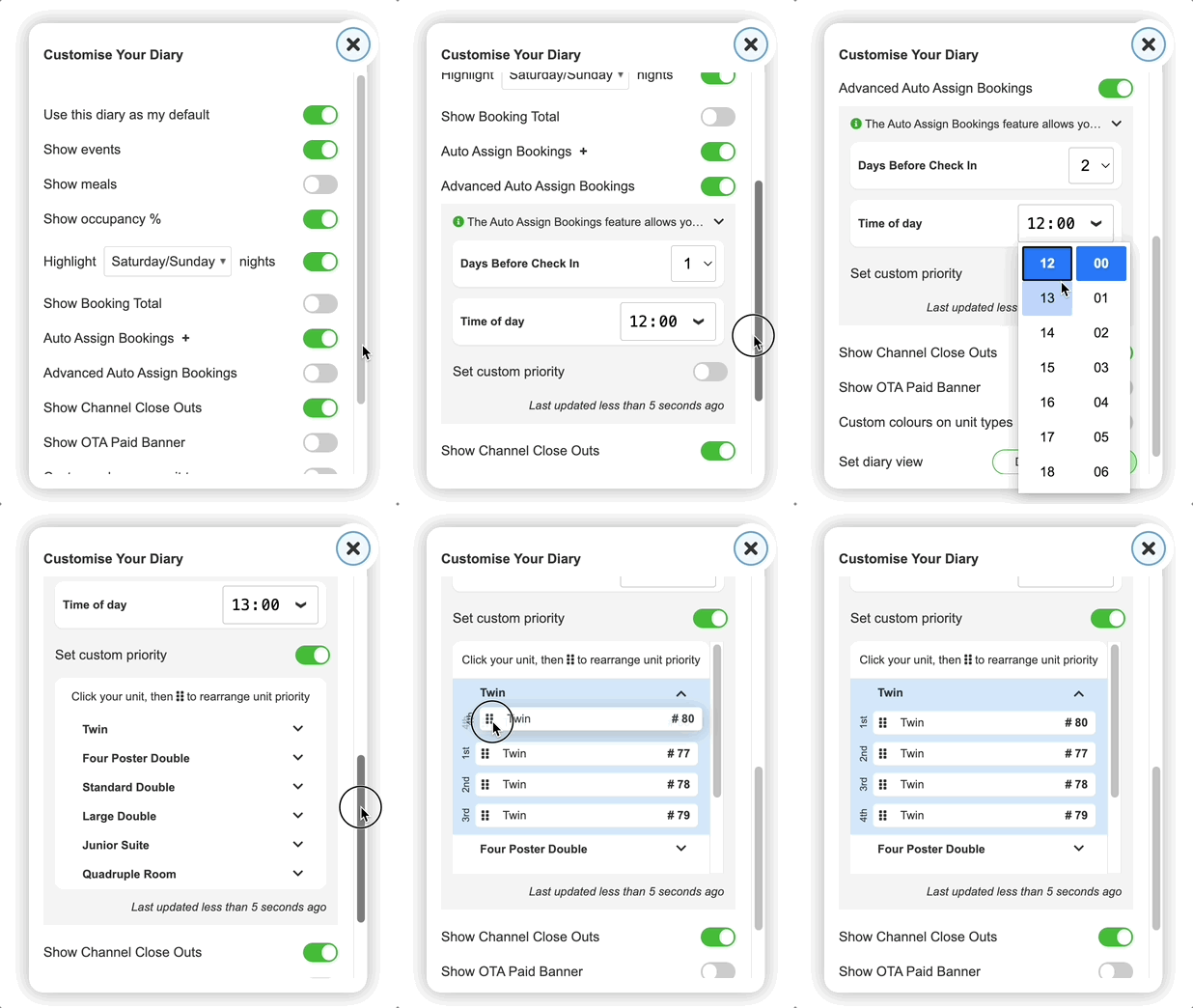
If you’re with freetobook, the option is already in your account.
That’s it! Once activated, you can wave goodbye to tedious manual room assignments and hello to a more efficient workflow.
Turn on Auto-Assign to experience effortless room allocation!
Scan the QR code to download the app